How a Dynamics 365 Customer Portal Improves Patient Management in Healthcare

Healthcare organizations today face a familiar paradox. You’ve invested in Microsoft Dynamics 365. Patient data already resides in the system. Workflows are configured. Your teams use it daily. But somehow, when patients need information, they’re still calling your front desk. Your staff is still looking things up manually. Everyone’s working harder than they should.
More than 50% of medical groups have reported increases in patient no-show rates over the past few years. The problem isn’t your CRM, but the fact that data visibility for your patients remains limited in Dynamics 365. While it does provide role-based access for organizations, adding more users entails additional costs that may not be feasible in the long run.
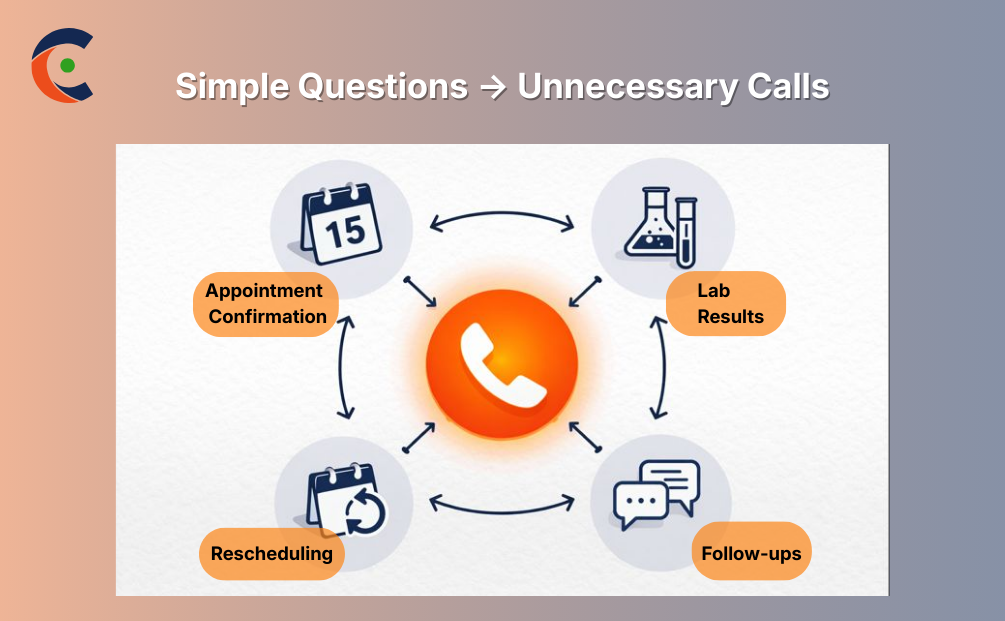
This disconnect shows up everywhere. A patient wants to confirm their appointment time—they call. Someone needs to check if lab results are back—another call. Basic information requests that should take 30 seconds stretch into longer conversations because patients have no direct access to care.
Meanwhile, care coordination gets more complex. Patients move between departments. Information needs to flow cleanly. But when access is limited to internal users only, handoffs depend on manual updates and staff availability. Things slip through cracks.
Disconnected communication, delayed information sharing, and manual processes—it all creates friction. And the friction grows as patient volumes climb and care journeys involve more touchpoints.
Healthcare leaders are realizing they don’t need to replace their CRM. They need to extend it. The data’s already there. The workflows are already configured. What’s missing is the patient-facing layer that makes it all actually accessible.
CRMJetty’s Dynamics 365 Customer Portal for healthcare extends your existing Dynamics setup into a secure patient-facing platform. Not a separate system. No more silos. Just a direct connection between patients and the CRM you’re already using—with proper security, proper controls, and proper governance.
Use Case 1: Disconnected Patient Information Across Departments
The Problem
Patient comes in for primary care. Provides insurance information, verifies address, and lists medications. Standard intake process. Two weeks later, the same patient presents to radiology for imaging. Guess what? They’re asking for insurance again, verifying address again, and confirming medications again.
From the patient’s perspective, it feels disjointed: “You’re all part of the same healthcare system—why isn’t this information already available?”
Your teams are frustrated, too. The information exists in Dynamics 365. It’s right there. However, across departments, verification still occurs manually. Maybe primary care’s data hasn’t synced yet. Perhaps radiology doesn’t fully trust the system. Workflows may differ slightly and require additional confirmation.
Either way, the patient experiences it as disorganization. Your staff experiences it as wasted time. And data fragmentation creates real risks—one department has the updated phone number, another’s using old contact info, and when something urgent comes up, those inconsistencies matter.
Without a unified view that everyone trusts, collaboration becomes reactive. You’re chasing down information that should already be accessible. Care coordination suffers because handoffs rely on manual verification.
Solution with CRMJetty Dynamics 365 Customer Portal
CRMJetty’s Dynamics 365 Customer Portal for healthcare provides a single, centralized access layer that connects directly to your Dynamics CRM. When a patient updates their information through the portal, the change is reflected in Dynamics immediately. Every department sees the same current data because there’s only one version.
Authorized teams reference the same patient record without duplicating anything or switching between systems. The portal reflects real-time CRM updates, so what patients see matches what your staff sees. No lag. No conflicts.
Patients gain secure access to their own information—they can verify what’s on file, update details that changed, and see what’s current. This reduces unnecessary verification requests and improves transparency on both sides.
Your teams operate with better context and fewer interruptions. Information flows more reliably. Patients are no longer asked for the same details repeatedly. Collaboration improves when everyone works from shared, trusted data.
The verification loops that ate up time? Those largely disappear. Staff capacity is redirected toward actual care coordination rather than manual data confirmation. Don’t believe us?
Use Case 2: Inefficient Appointment Coordination
The Problem
Your scheduling staff handles appointment requests all day. Patient calls to book. Staff checks availability, finds a slot, and sends confirmation. Patient needs to reschedule—another call, another manual update. Patient forgets entirely and doesn’t show—that slot’s wasted, and you won’t fill it in time.
Multiply this across hundreds of patients, and the workload becomes unsustainable. Booking changes, confirmations, and reminders—every step requires staff intervention. Follow-ups pile up. Responses get delayed.
Missed appointments disrupt daily operations. Resources sit idle, waiting for patients who don’t show up. Over time, these inefficiencies limit the number of patients you can serve, even when you have available capacity.
Solution with CRMJetty Dynamics 365 Customer Portal
CRMJetty’s Dynamics 365 Customer Portal for healthcare enables patient self-service for appointment management. Patients log in, view available appointment slots exposed from Dynamics 365, and submit appointment requests that fit their schedules. The system automates confirmations and reminders, significantly reducing staff involvement for routine scheduling.
Because scheduling data syncs directly with Dynamics 365, your teams maintain full oversight. They approve requests, manage exceptions, and adjust schedules as clinical needs shift. But the routine back-and-forth? That handles itself.
Schedule stability improves because patients can self-manage without waiting for callbacks. Administrative effort drops significantly—your staff isn’t playing phone tag anymore. Resource utilization gets better because appointment slots fill more efficiently and no-shows decrease when patients control their own scheduling.
Patients get faster responses and greater flexibility. Your teams get their time back for work that actually requires human judgment.
Use Case 3: Limited Visibility for Patients During Care Journeys
The Problem
Appointment happens. The doctor orders lab work. Patient goes home and waits. Are the results back? What did they show? Do I need to schedule a follow-up? What am I supposed to do next?
Right now, the answer to these questions is: call and ask, or wait for someone to call you. Patients have zero visibility into their care status unless they actively reach out. This creates a steady stream of “just checking if…” phone calls that consume staff time.
Information delivered across multiple channels—voicemail, mail, occasional emails—becomes difficult to track. Patients miss follow-up instructions because they weren’t quite clear or got buried in other communications. Engagement with care plans drops because people feel disconnected from their own health information.
Solution with CRMJetty Dynamics 365 Customer Portal
CRMJetty’s portal provides a single, structured space where patients can access everything related to care. Lab results become visible once providers release them through Dynamics 365 workflows. Test reports, imaging summaries, follow-up instructions—all visible in one place, sourced directly from Dynamics 365.
Patients don’t need to call to ask if results are ready. They log into the portal. It’s there, or it’s not. Follow-up instructions are spelled out clearly. Next appointment requirements are visible. Everything they need to stay on track with their care plan lives in one accessible location.
Patient engagement improves because visibility increases. People follow through on care instructions more consistently when they can actually see what’s expected. The volume of routine inquiry calls drops significantly—patients get information themselves rather than relying on staff for updates.
Your teams spend less time answering “what’s my status” questions and more time on complex care coordination that requires actual expertise.
Use Case 4: Managing Access and Compliance Without Complexity
The Problem
Here’s what happens in every healthcare IT meeting when someone suggests patient portals: immediate concerns about data protection, compliance risks, and audit readiness.
These concerns are legitimate. Healthcare data is sensitive. HIPAA regulations are strict. Getting access controls wrong creates serious exposure. So the question becomes: how do you give patients access without creating compliance nightmares?
Many organizations avoid patient portals entirely because managing access seems too complex or risky. Better to stick with phone calls and manual processes than open up potential security gaps.
Solution with CRMJetty Dynamics 365 Customer Portal
CRMJetty’s Dynamics 365 Customer Portal for healthcare doesn’t bypass your security model—it leverages it. The portal operates on top of Dynamics 365’s existing role-based security infrastructure. Access rules you’ve already configured in Dynamics extend automatically to portal users.
Patient logs in, the system checks: what should this user be able to see? The answer comes straight from Dynamics 365 security roles and field-level permissions you’ve already defined. No separate permission system to manage. No gaps where portal access doesn’t match CRM access.
All portal activity logs are centrally in Dynamics alongside internal access. When auditors ask “who accessed what and when,” you pull standard Dynamics audit reports. Everything’s tracked in one system using the governance framework you already have.
Patients authenticate properly before seeing anything. Data transmission is encrypted. Access can be configured to expire automatically based on defined rules. Sessions are managed securely. All the safeguards healthcare IT expects are present and configurable through standard Dynamics workflows.
Your organization confidently enables digital patient access while maintaining data protection and regulatory compliance. Security stays centralized. Audit trails stay complete. Governance doesn’t fragment across multiple systems.
You’re not relaxing security to improve patient experience. You’re building patient access into your existing security model in a structured, maintainable way that’s actually easier to audit than phone calls and faxed documents.
Business Impact for Healthcare Organizations
When healthcare organizations implement CRMJetty’s Dynamics 365 Customer Portal for patient management, several measurable changes happen quickly.
Administrative workload drops. Front desk teams that spent hours fielding routine questions suddenly have that time back. The questions don’t disappear—they’re answered through the portal, eliminating the need for staff intervention. One regional health system saw routine inquiry call volume drop 40% within three months of portal implementation.
Operational clarity improves. Patient interactions that previously happened across scattered phone calls and emails now flow through structured portal workflows. This creates visibility you didn’t have before. Leadership can see engagement patterns, identify process bottlenecks, and make data-driven improvements.
Patient interactions become measurable. How many people actively use the portal? Which features get used most? Where do patients drop off in processes? All of this surfaces through analytics feeding back into Dynamics 365, enabling continuous operational refinement.
Scalability changes fundamentally. Growing patient volume without proportionally growing administrative staff becomes feasible when routine interactions are handled in-house. Your Dynamics infrastructure already scales—now your patient engagement model scales with it.
Most importantly, staff capacity gets redirected. Time freed up from routine inquiries goes toward complex care coordination, exception handling, and patients with special needs who benefit from direct attention. The high-value work often gets squeezed out when teams are buried in administrative tasks.
When processes are structured and accessible, healthcare teams dedicate more energy to actual care delivery rather than managing operational friction.
The Path Forward
Healthcare organizations need digital solutions that enhance patient engagement without disrupting existing systems. You’ve invested in Microsoft Dynamics 365. The data exists. Workflows are configured. Governance is established.
What you haven’t done yet is extend that investment outward to the people who need it most—your patients.
CRMJetty’s Dynamics 365 Customer Portal for healthcare transforms your existing Dynamics 365 setup into a secure, patient-facing experience. Without replacing existing systems or creating additional silos. Just connecting patients directly to the CRM infrastructure you’re already managing, with proper security and proper controls.
The result is better access, cleaner coordination, stronger communication—for both patients and internal teams. Administrative burden decreases. Operational visibility increases. Patient engagement becomes measurable and manageable.
Healthcare delivery keeps evolving. Patient expectations keep rising. The organizations that will handle this successfully aren’t the ones constantly replacing systems. They’re the ones that built their systems to extend, to scale, to adapt.
Ready to see how this works with your existing Dynamics 365 foundation?
Original Blog: https://www.crmjetty.com/blog/dynamics-365-customer-portal-for-patient-healthcare/


Comments
Post a Comment